EMCO UnLock IT6.1.1
Publisher Description
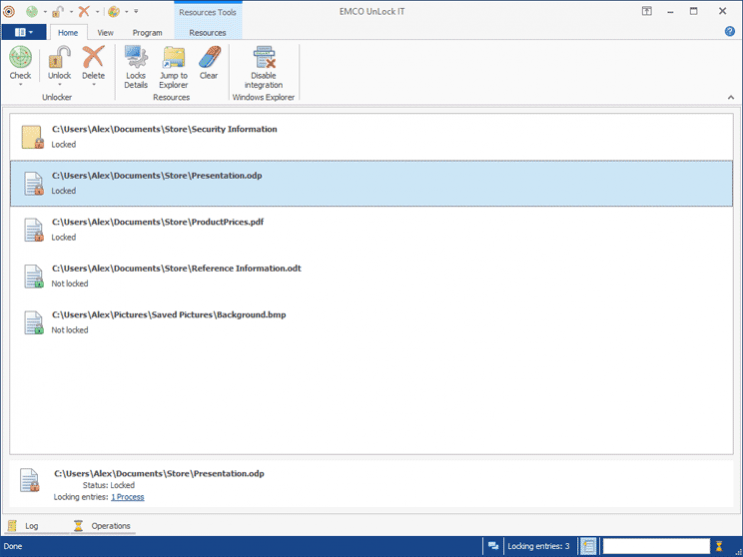
UnLock IT is a free utility used to unlock files and folders locked by applications or system processes. It can help you every time when you get an Access Denied error while trying to change, rename or delete files or folders, because they are locked. UnLock IT allows you to detect processes that lock a resource and unlock it by closing file and library handles to the resource. If the resource cannot be unlocked by these methods, you will be prompted to kill the processes that hold locks. The application can terminate not only regular applications and system processes but also viruses, trojans and other spyware processes that have a special protection from termination.
UnLock IT integrates into Windows Explorer, so you can launch it by selecting a corresponding item from the context menu for any resource. It gives you a one-click access to checking any resource for locks and unlocking it if required.
About EMCO UnLock IT
This File & Disk Management program is available in English. It was last updated on 29 September, 2026. EMCO UnLock IT is compatible with the following operating systems: Windows.
The company that develops EMCO UnLock IT is EMCO Software. The latest version released by its developer is 6.1.1. This version was rated by 2 users of our site and has an average rating of 3.5.
The download we have available for EMCO UnLock IT has a file size of 69.2 MB. Just click the green Download button above to start the downloading process. The program is listed on our website since 2021-11-30 and was downloaded 406 times. We have already checked if the download link is safe, however for your own protection we recommend that you scan the downloaded software with your antivirus. Your antivirus may detect the EMCO UnLock IT as malware if the download link is broken.
How to install EMCO UnLock IT on your Windows device:
- Click on the Download button on our website. This will start the download from the website of the developer.
- Once the EMCO UnLock IT is downloaded click on it to start the setup process (assuming you are on a desktop computer).
- When the installation is finished you should be able to see and run the program.
Program Details
System requirements
Download information
Pricing
Version History
version 6.1.1
posted on 2021-11-30
Version 6.1.1 introduces the Backstage view and includes a few bug fixes.
version 6.0
posted on 2021-08-02
Version 6.0 introduces unlocking shared resources and includes a few bug fixes.
version 5.0.2
posted on 2020-05-21
Version 5.0.2 includes a few bug fixes.
version 5.0.1
posted on 2020-05-05
Version 5.0.1 includes a few improvements and bug fixes.
version 5.0
posted on 2017-12-21
Version 5.0 allows to check and grant file system permissions, if a resource cannot be managed due insufficient permissions. Also it allows to schedule deletion on boot if a resource cannot be unlocked and deleted using different methods.
version 4.0.1
posted on 2015-09-03
Version 4.0.1 becomes compatible with Windows 10 and includes a few important improvements.
version 1.7.0
posted on 2008-06-11
Version 1.7.0 contains a set of improvements and bugfixes including Vista UAC support, Ribbon User Interface and x64 platforms support.
